> ## Documentation Index
> Fetch the complete documentation index at: https://ionet-cca8037f-confidential-compute.mintlify.site/llms.txt
> Use this file to discover all available pages before exploring further.
# Generating Your First AI Image
1. Go to the **Generate** section in the main menu.
 2. Enter an image description in the prompt field (e.g., "robot in cyberpunk style").
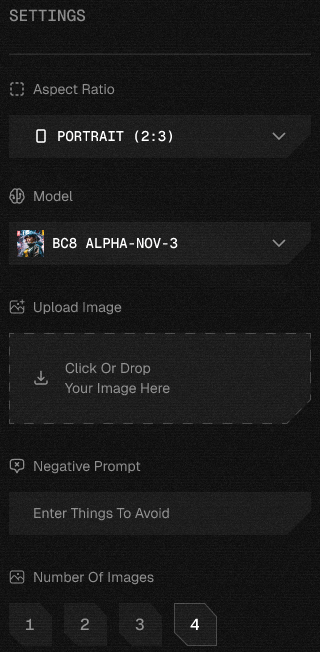
3. Adjust settings as needed:
* Aspect Ratio
* Model
* Upload Image
* Number Of Images
* Set Advanced Settings (optional):
* Guidance Scale
* Scheduler
* Inference Steps (35/55/75)
* Seed Number
2. Enter an image description in the prompt field (e.g., "robot in cyberpunk style").
3. Adjust settings as needed:
* Aspect Ratio
* Model
* Upload Image
* Number Of Images
* Set Advanced Settings (optional):
* Guidance Scale
* Scheduler
* Inference Steps (35/55/75)
* Seed Number
 4. Click **Generate**.
 The generation process will begin, and you'll see each image created individually. Please be patient, as this may take some time.
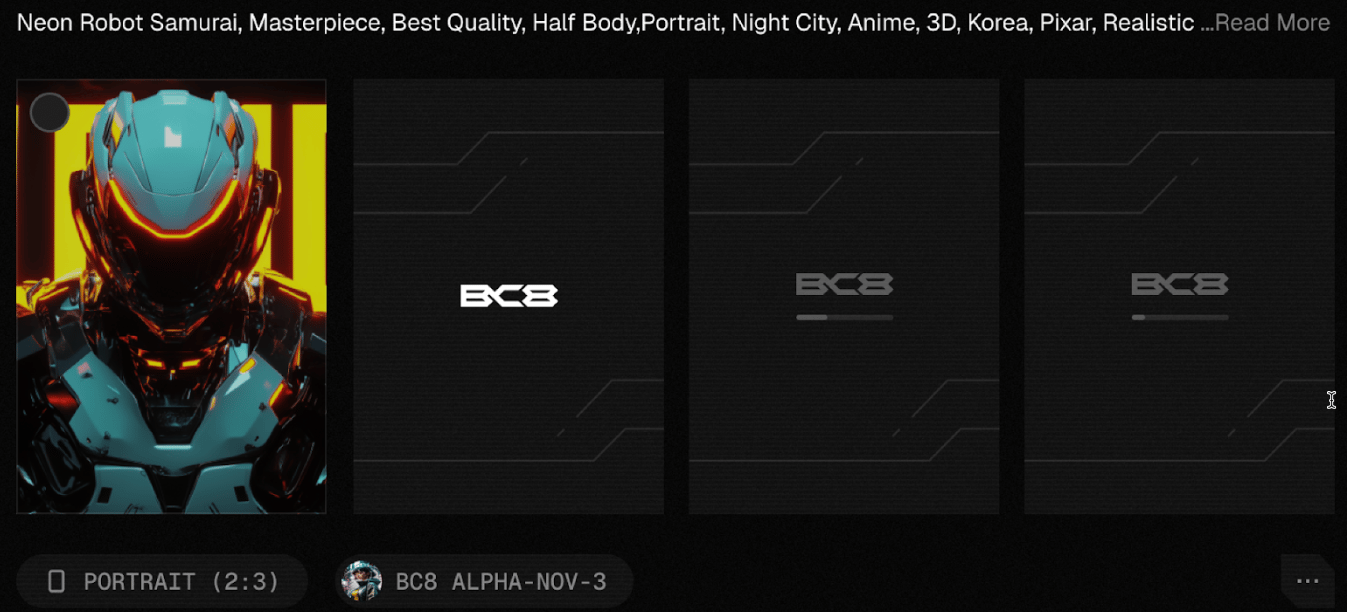 5. After generation, use the dropdown menu for this prompt to:
* **Generate Again** – Recreates the output using the same prompt for variations.
* **Reuse Prompt** – Allows you to edit or reuse the prompt for a new generation.
* **Copy Seed** – Copies the unique seed to reproduce the same output later.
* **Download All** – Saves all generated outputs to your device.
* **Delete All** – Removes all generated results from the interface.
6. View Previously Created Prompts:
To see the details of a prompt you have generated, simply click on it. A pop-up will appear with the generated result. The pop-up contains the following information and options:
* Generated Image
* Creator’s Profile ID
* Show on Profile (toggle, off by default)
* Copy Prompt button
* Model Information, including:
* Model name
* Guidance Scale - Controls how closely the output follows the prompt. Higher values mean stricter adherence; lower values allow more creativity.
* Inference Steps - The number of steps taken to refine the output. More steps improve quality but take longer.
* Scheduler – Defines how noise is removed during generation, affecting style, sharpness, and smoothness.
* Dimensions set the image’s width and height.
* Seed ensures reproducibility; the same seed with the same settings will generate identical results.
* Generate Similar Model button
* Download Image option
* Share button
* Delete button (includes a confirmation popup before deleting the image)
5. After generation, use the dropdown menu for this prompt to:
* **Generate Again** – Recreates the output using the same prompt for variations.
* **Reuse Prompt** – Allows you to edit or reuse the prompt for a new generation.
* **Copy Seed** – Copies the unique seed to reproduce the same output later.
* **Download All** – Saves all generated outputs to your device.
* **Delete All** – Removes all generated results from the interface.
6. View Previously Created Prompts:
To see the details of a prompt you have generated, simply click on it. A pop-up will appear with the generated result. The pop-up contains the following information and options:
* Generated Image
* Creator’s Profile ID
* Show on Profile (toggle, off by default)
* Copy Prompt button
* Model Information, including:
* Model name
* Guidance Scale - Controls how closely the output follows the prompt. Higher values mean stricter adherence; lower values allow more creativity.
* Inference Steps - The number of steps taken to refine the output. More steps improve quality but take longer.
* Scheduler – Defines how noise is removed during generation, affecting style, sharpness, and smoothness.
* Dimensions set the image’s width and height.
* Seed ensures reproducibility; the same seed with the same settings will generate identical results.
* Generate Similar Model button
* Download Image option
* Share button
* Delete button (includes a confirmation popup before deleting the image)